LightBridge
  • Services
  • Ansys Lumerical
  • About
    • The Company
    • Our Team
  • Get in touch
  • Menu Menu
現在位置: ホーム1 / 光学設計ソフトウェア Lumerical と Zemax の連携方法2 / ブログ3 / 光学設計ソフトウェア Lumerical と Zemax の連携方法
ブログ

光学設計ソフトウェア Lumerical と Zemax の連携方法

この記事では、Zemax から Lumerical の有限差分固有モード (FDE) ソルバーに情報を変換する方法を説明します。これは、システムの一部がバルク光学系、もう一方が導波路のような多段構成の場合に役立ちます。この例では、集光レンズから小さなシリカファイバーへの結合を見ていきます。まず、偏光ビームを Zemax Beam File (.zbf) として Lumerical Eigenmode Solver にエクスポートします。そして、Lumerical Eigenmode Solver で作成されたモードとエクスポートされた Zemax ビームとの重なりと電力結合を計算します。Lumericalのビーム間の重なり解析により、より良いモードが示唆されます。このモードは、Zemax Beam File として Lumerical から OpticStudio に再度エクスポートされます。

はじめに

この記事では、Zemax から Lumerical Eigenmode ソルバーソフトウェアへの情報変換方法を説明します。これは、システムの一部が OpticStudio で効率的にシミュレーションできるが、他の部分 (導波路、フォトニック結晶など) で電磁波伝播ツールが必要な場合に役立ちます。Lumerical の有限差分固有モード (FDE) ソルバーを使用して、任意の導波路形状がサポートする光モードの物理特性を決定することができます。
この例では、Lumerical Eigenmode ソルバーソフトウェアを使用して、集光レンズからの小さなシリカファイバーへの結合について説明します。このチュートリアルでは、Lumerical ソフトウェアにある程度習熟されていることを前提としています。

OpticStudio からデータを取得

まず、OpticStudio を起動します。解析機能 (2D レイアウトなど) を選択して、光線がどのように一点に集束するかを確認できます。像面は、ファイバーの受信側の入力端として機能します。このファイバーは屈折率 1.43 の材料と、1% 反射、99% 透過させる AR コーティング COAT I.99 を使用しています。
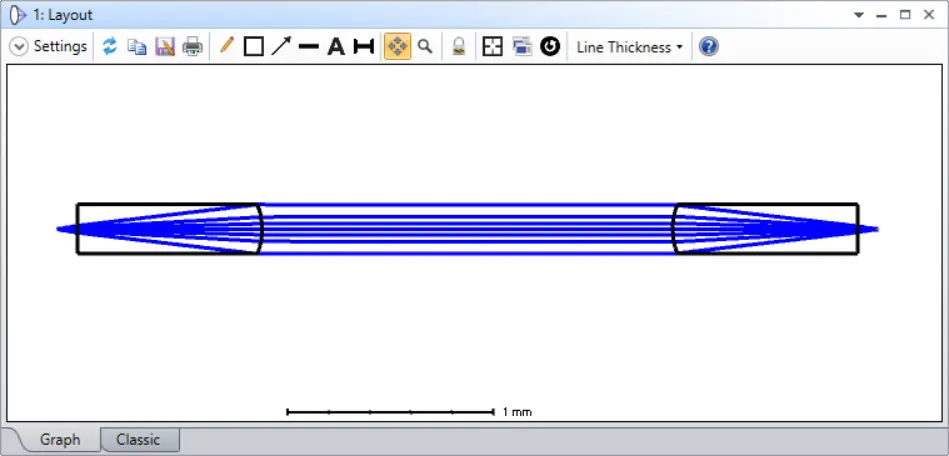
OpticStudio 2Dレイアウト

解析→[物理光学](Physical Optics)を選択して、6ミクロンのウェストをもつガウスビームがレンズ光学系の像面に合焦することを確認します。
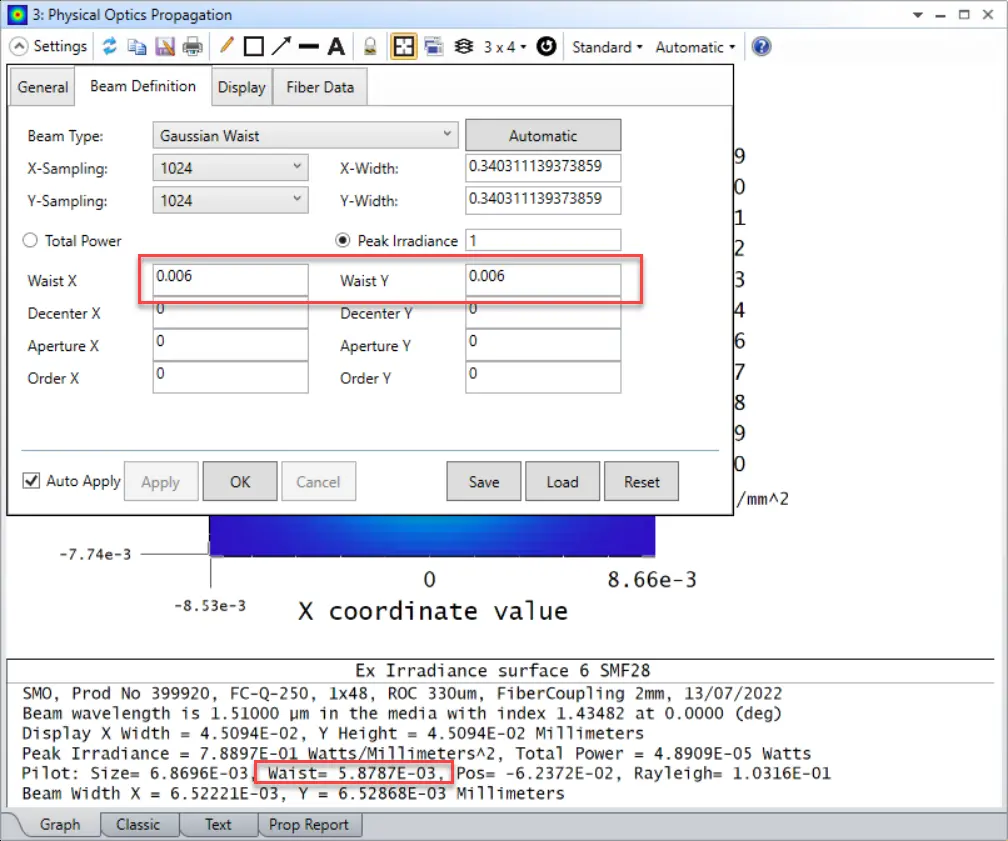
Zemax OpticStudio Physical Optics Propagation

像面で計算されたビームウェストは 5.8787μm、レイリー長は 0.1mm です。入力ウエスト 6 μmで計算されたファイバー結合は、受信側で 95% です。
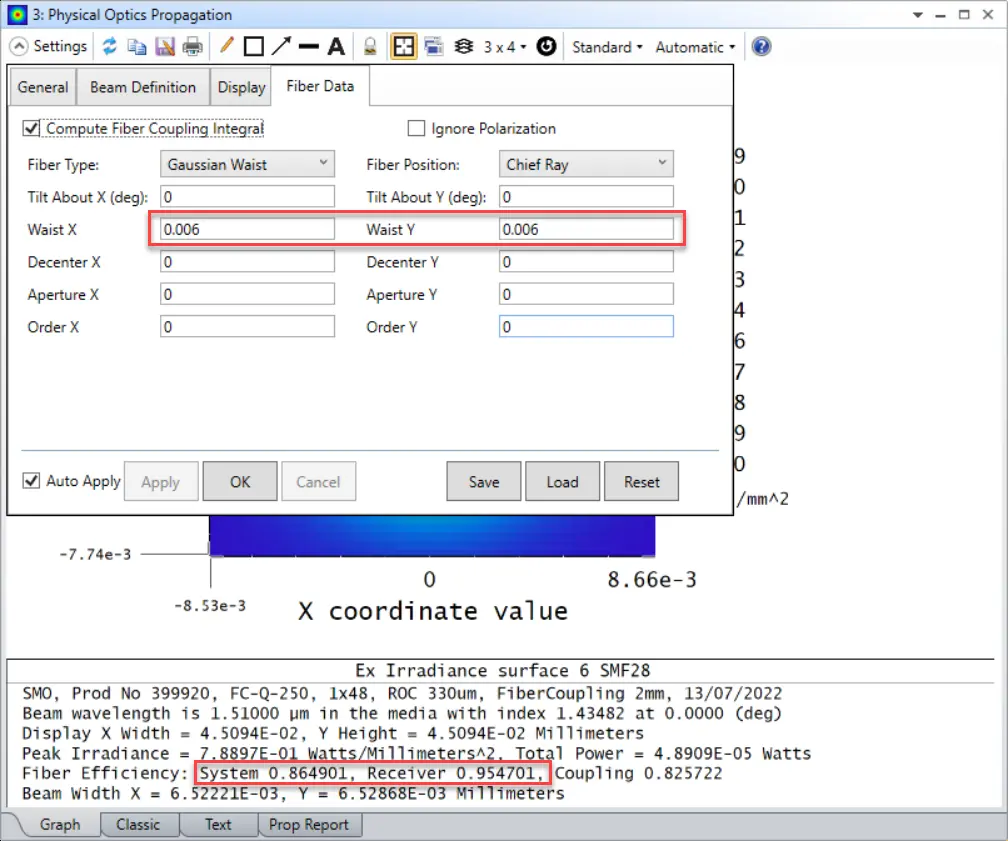
OpticStudio Beam waist calculated at image plane

ここから、OpticStudio にビームファイルを出力させることができます。後で Lumerical でインポートする必要があります。「物理光学伝播」ウィンドウの上部にある「設定」オプションをクリックし、「表示」タブを選択して「出力ビームの保存先」オプションをクリックします。次に、ファイル名を Fiber_output.zbf に設定し、OK を押します。「偏光を使用」チェックボックスを選択してベクトルビームを定義します。偏光がないとビームはスカラーとなり、Lumerical で zbf ファイルを読み込むにはスクリプトコマンドを使用する必要があります。
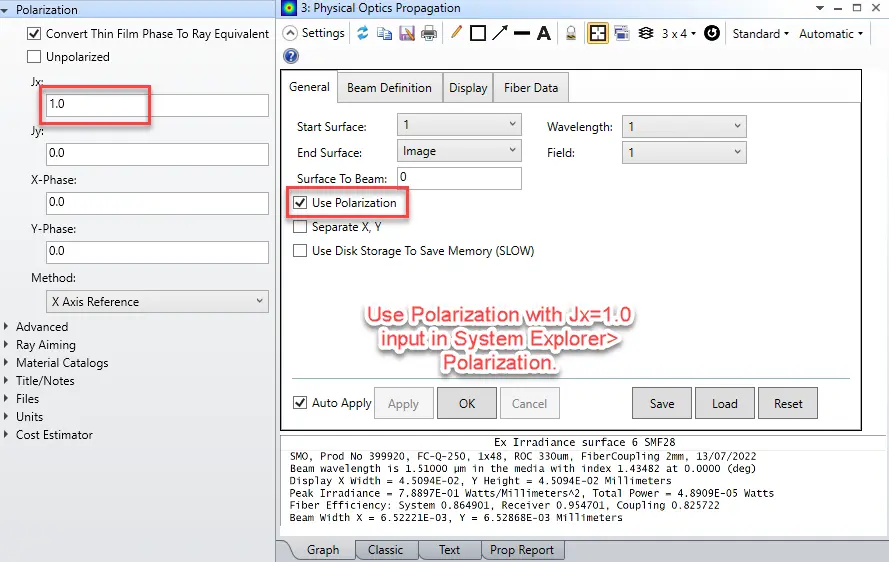
OpticStudio Polarization

これらのファイルは通常、{Zemax}\POP\BEAMFILES ディレクトリに保存されるので、そこからファイルを見つけることができます。
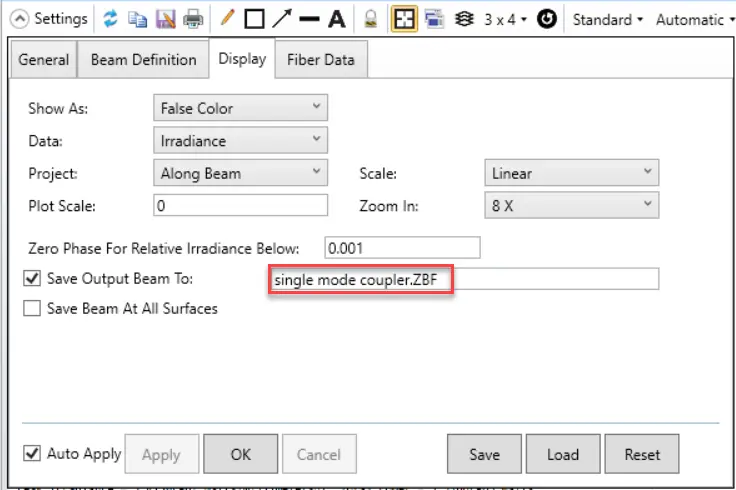
OpticStudio Beam files

モード計算のためのファイバー構造を作成する

このセクションでは、ステップインデックスファイバーを作成します。Lumerical ランチャーを開き、有限差分固有モード (FDE) ソルバーを選択します。step_index_fiber.lms ファイルは、このAnsys Lumerical記事 のダウンロードセクションからもダウンロードできます。
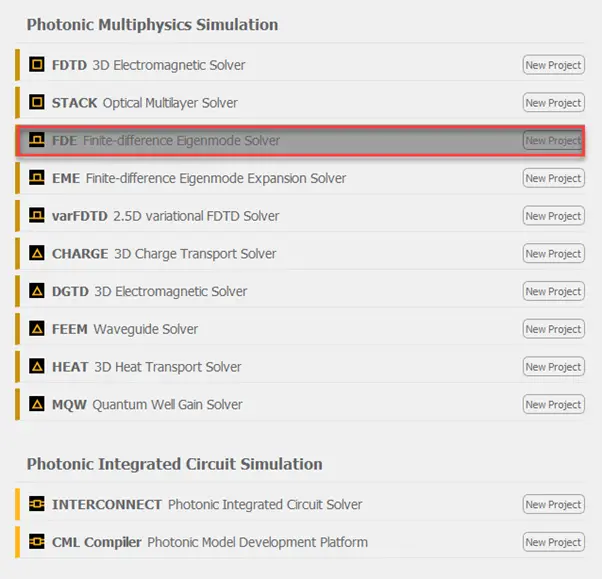
Open Ansys Lumerical launcher and select a finite-difference eigenmode (FDE) solver

ステップインデックスファイバーの物理構造は、レイアウトエディターの「構造」タブを使用して作成されます。「構造」(Structures)ボタンの矢印をクリックし、プルダウンメニューから「円」を選択します。
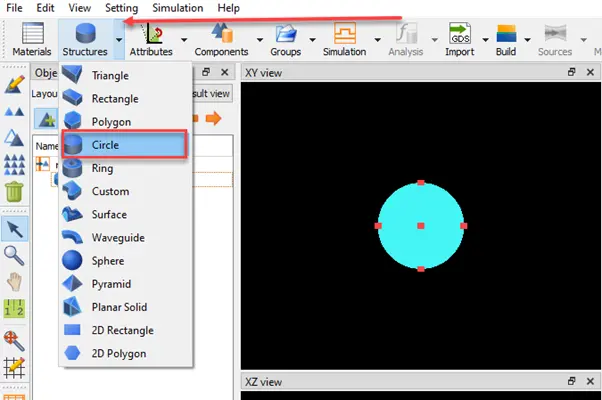
Press the arrow on the STRUCTURES button in Lumerical Layout Editor and select CIRCLE from the pull-down menu.

次に、オブジェクトのプロパティを編集します。

Edit the object properties in Lumerical MODE

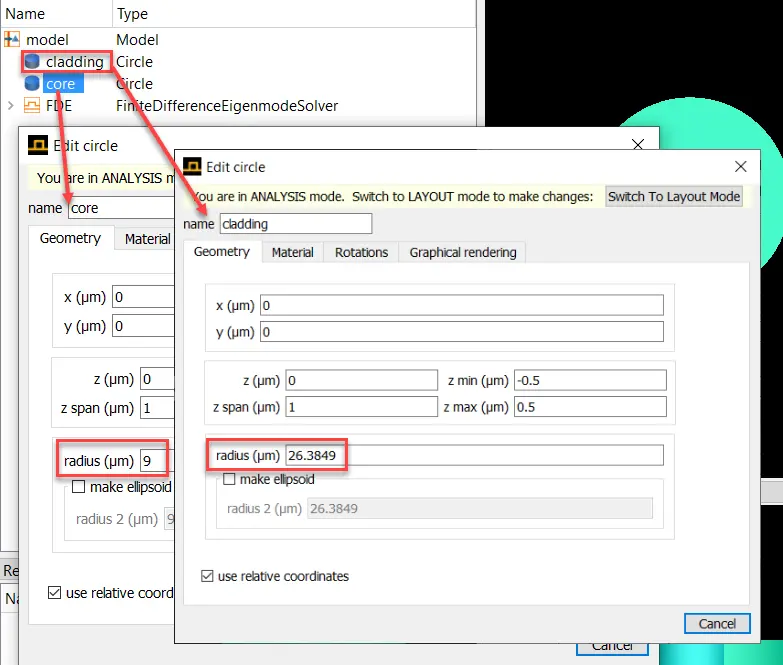
円クラッドとコアのプロパティを以下の表に従って設定します。

コア

「設計」(Design)タブの「構造」(Structures)セクションから、オブジェクトツリーに追加する「円」(Circle)を選択します。オブジェクトツリーで円を選択し、Edit Properties「プロパティ編集」ボタンをクリックして、以下の表に従って円のプロパティを編集します。

abプロパティ値
nameCore
x (μm)0
y (μm)0
z (μm) / z span (μm)1
radius (μm)9
材料Object defined dielectric
屈折率1.44
メッシュオーダー2

クラッド

「設計」タブの「構造」セクションから、オブジェクトツリーに追加する別の「円」を選択します。オブジェクトツリーで円を選択し、「プロパティ編集」(Edit Properties)ボタンをクリックして、以下の表に従って円のプロパティを編集します。
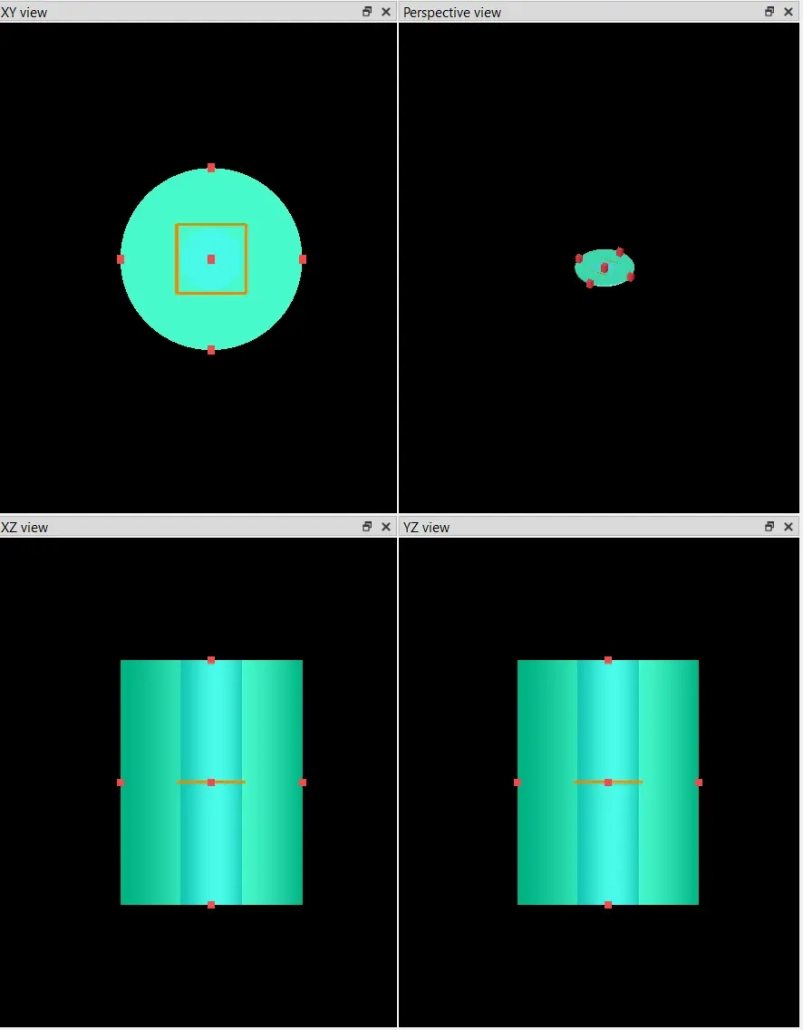
注意:メッシュの分割において、”clad” (クラッド) 構造が “core”(コア) 構造と重なる領域を埋めないように、メッシュ次数を5 (デフォルトの2よりも高次) に設定しています。また、”clad” 構造のz方向の範囲を “core” 構造よりもわずかに小さくすることで、viewport(ビューポート)で “core” 構造が “clad” 構造によって隠れないようにしています。別の方法としては、”clad” プロパティのグラフィック設定(Graphical rendering)タブでアルファ値を1未満にすることで、”clad” 構造を半透明にすることもできます。

abプロパティ値
namecladding
x (μm)0
y (μm)0
z (μm) / z span (μm)0 / 1
radius (μm)26.389
材料Object defined dielectric
屈折率1.4
オーバーライド・メッシュオーダー☑
メッシュオーダー5

シミュレーション領域

FDEオブジェクトをクリックし、「プロパティ編集」ボタン(オブジェクトツリーの左側)をクリックして、以下の表に従ってプロパティを編集します。シミュレーション領域のサイズは、クラッド円筒が完全に内側に収まるようにし、シミュレーション領域の境界はすべて開いているように設定します。目的は、クラッド円の外表面にシミュレーション境界条件を割り当てることです(境界条件を参照)。

タブプロパティ値
GeometryX0
X span35
Y0
Y span35
Z0
Structure view

ステップインデックスファイバーの屈折率分布

以下の図のように、屈折率分布を表示することができます。屈折率分布を表示するには、メッシュ構造をクリックします。
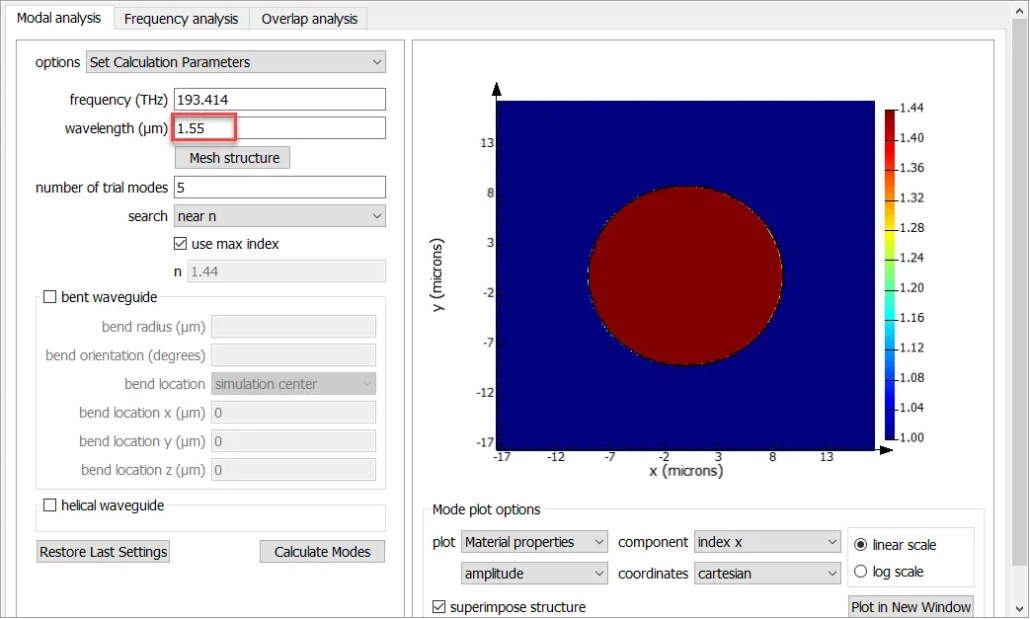
Index profile of Step Index fiber

Zemax ビームファイルのインポート

物理構造とシミュレーション領域が定義されたら、MODE の有限差分固有モードソルバー (FDE) 解析コンポーネントについて説明します。構造が作成できたので、励振するフィールドの設定に進みます。Zemax Beam File はすでに single mode coupler.ZBF としてエクスポートされています。ここでは、Eigensolver解析ウィンドウのデッキにある single mode coupler.ZBF ファイルをインポートします。


Zemax LLC\Documents\Zemax\Samples\POP\BEAMFILESからZBFファイルをロードします。
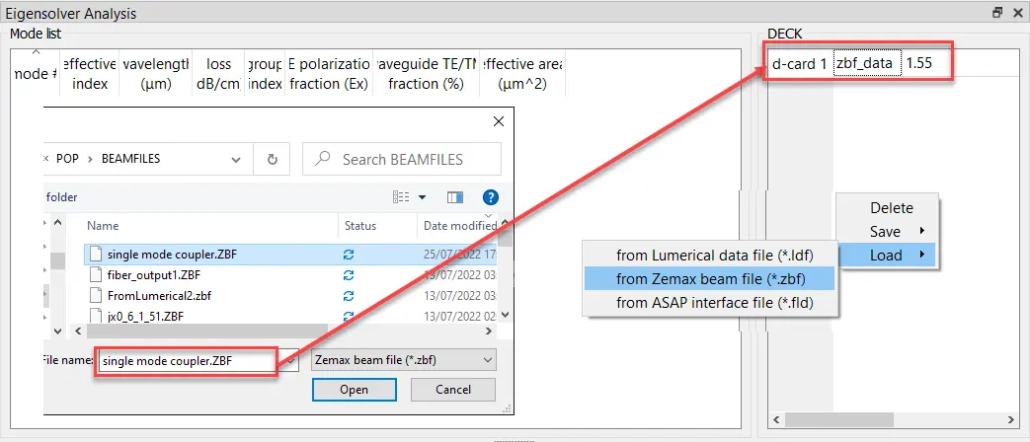
import the single mode coupler.ZBF file in the Deck of Eigen solver Analysis Window

モードの計算

Lumerical でフィールドを表示するには、Zemax ビームファイルからモードを計算する必要があります。波長を OpticStudio と同じ 1.55μmに設定する必要があります。「モード計算」をクリックすると、モード面積が表示されます。以下の図をご覧ください。
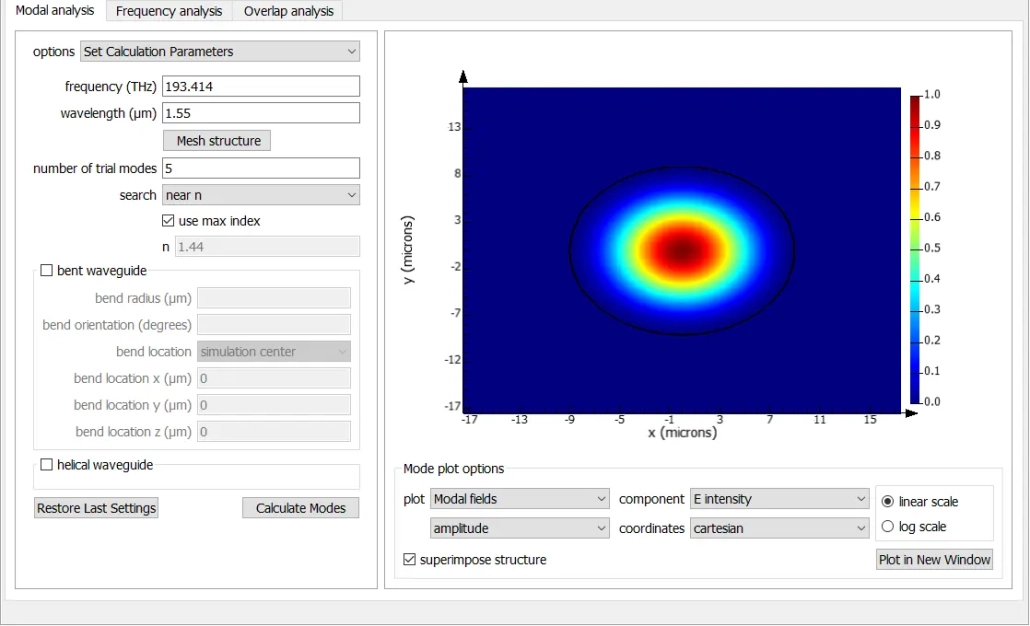
calculate the modes from Zemax Beam File in Lumerical MODE

ガウスビームとの電力結合と重なり解析

重なりは、2 つのフィールドプロファイルの間で重なる電磁場の割合として定義され、以下の式で計算されます。ここで、E1、H1 はモード 1 のフィールド、E2、H2 はモード 2 のフィールドです。
電力結合は、あるモードから別のモードに結合する電力の割合を表します。入力モード (電力 Pin) と i 番目のモード (電力 Pi) を考えると、電力結合は以下の式で与えられます。電力結合は、モード重なりとモード間の実効屈折率の不一致の両方を考慮した総入力結合を与えます。

Input : E_input and H_input

ith Mode: E_i and H_i
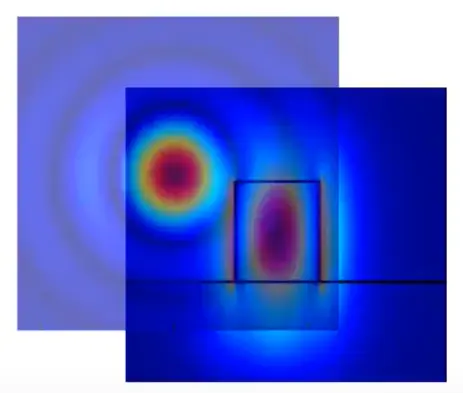
power coupling equation

Zemax Beam File で生成された基本モードと結合する最適なスポットサイズを決定するために、理想的なガウスビームとの重なりを計算します。「重なり」(Overlap)タブを選択すると、以下のスクリーンショットが表示されます。「計算」(Calculate)ボタンをクリックすると、現在選択されているモードと現在選択されている D-CARD の重なりと電力結合が計算されます。
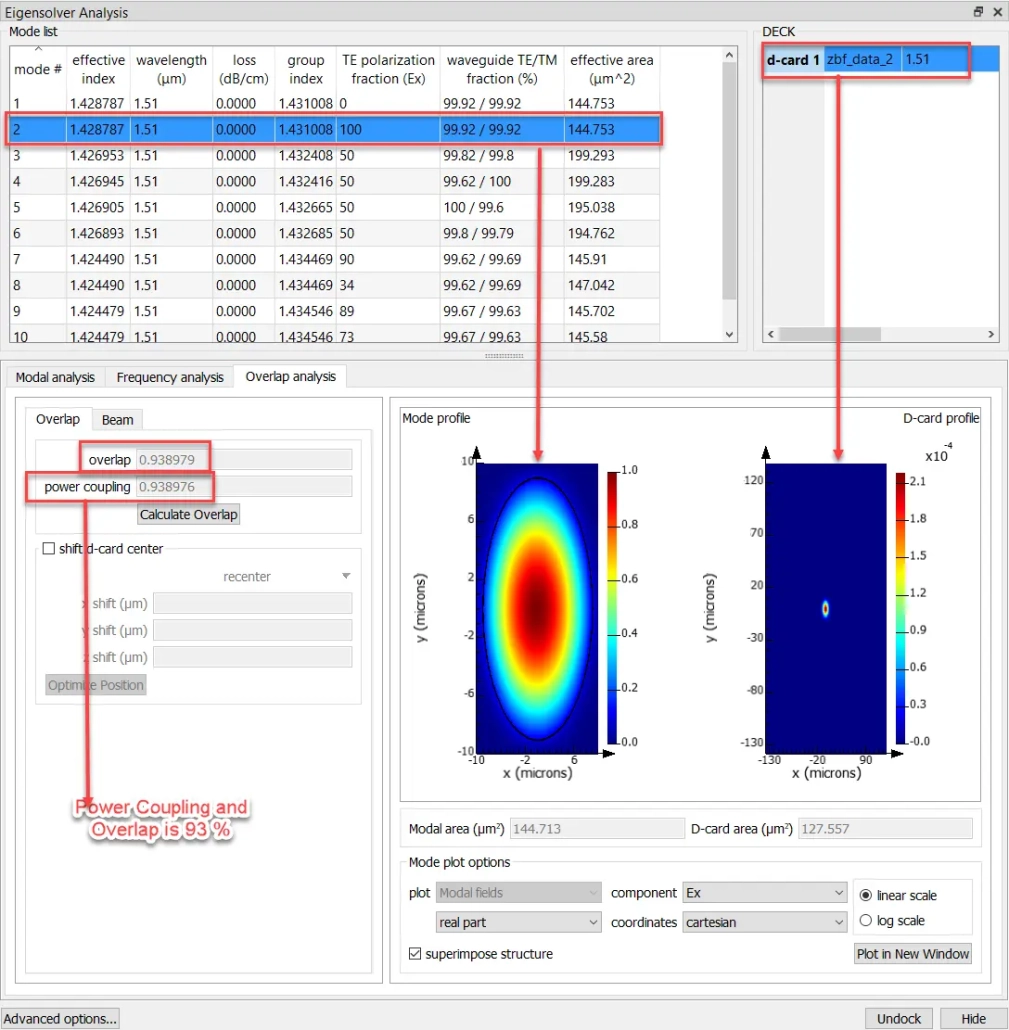
calculates the overlap and the power coupling of the currently selected mode with the currently selected D-CARD

以前見たように、モード 2 は Zemax ビームファイルと最大の電力結合と重なりを持っています。「ビーム」タブでは、有効面積を一致させるためにガウスパラメータを確認する必要があります。Zemax Beam File からエクスポートされたガウスビームの有効面積は πw02 であり、w0 = sqrt(122.557/π) μm = 6.3 μm です。モード 2 は w0 = sqrt (122.557/π) μm = 6.7 μm です。モード面積 144.713 μm2 に合わせるには、ウエスト半径 w0 = sqrt (1.2/π) μm = 6.7 μm が必要です。モード 2 を Zemax Beam File として OpticStudio にエクスポートし、ファイバー結合効率を確認します。
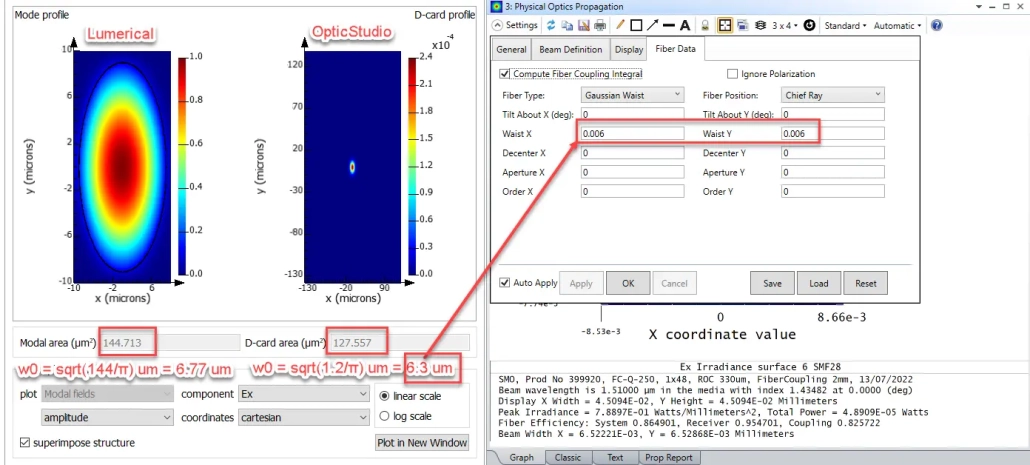
check the Gaussian parameters so that we can match the effective areas

OpticStudio への Zemax ビームファイルのエクスポート

モードをデッキ内の D-CARD としてエクスポートします。効率の高い D-CARD は Zemax Beam File として保存できます。このビームを OpticStudio にインポートして、結合効率を確認します。
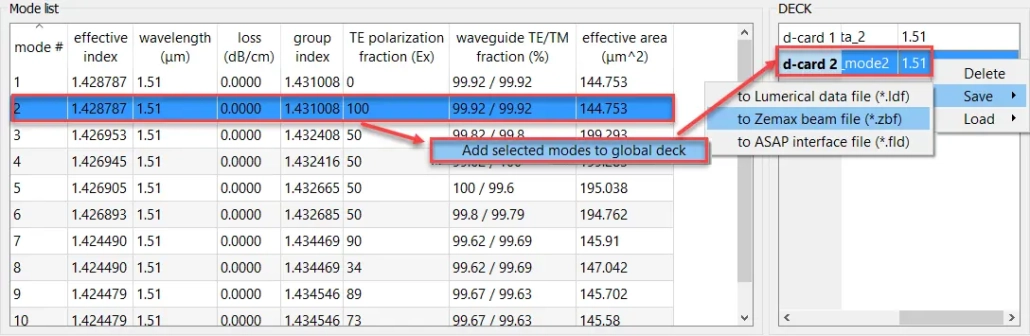
Export the Mode as d-card in Deck.

OpticStudio への新しい Zemax ビームファイルのインポート

Lumerical デッキで作成した新しい Zemax Beam File を OpticStudio Beam File Viewer にインポートします。Lumerical モード 2 から提案されたウエスト半径 6.544 μm が Zemax Beam File Viewer にインポートされたことがわかります。POP ビーム定義とファイバーデータでウエストサイズを変更すると、ファイバー結合効率は 96.02% に向上しました。以前は、ビームウエストは 6 µm で、ファイバー結合効率は 95.47% でした。
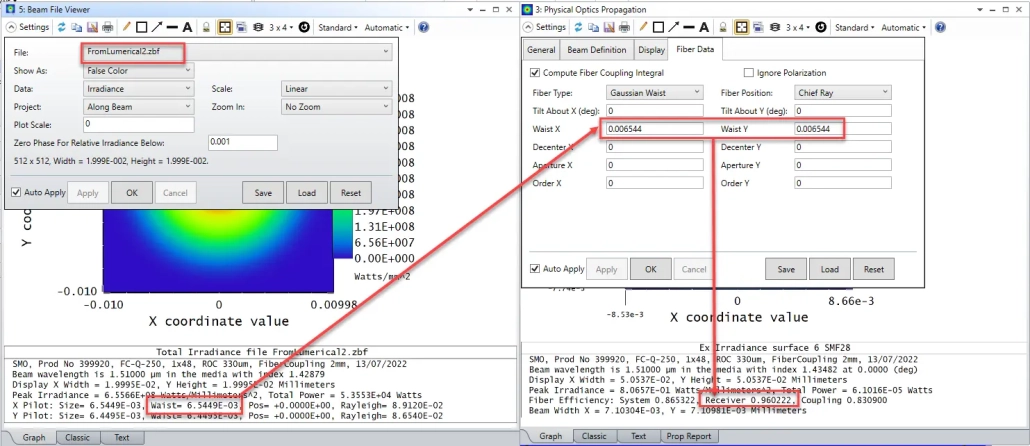
import the new Zemax Beam File created in Lumerical deck back to OpticStudio Beam File Viewer

結論

この記事では、Lumerical と OpticStudio を連携して光学系を設計する方法を説明しました。この方法は、システムの一部がバルク光学系、もう一方が導波路のような多段構成の場合に役立ちます。
2月 27, 2024
タグ: Lumerical MODE, OpticStudio, Zemax
Share this entry
  • Share on Facebook
  • Share on X
  • Share on WhatsApp
  • Share on LinkedIn
  • Share by Mail
https://www.lightbridge.co.jp/wp-content/uploads/2022/03/logo_LightBridge-300x88.webp 0 0 Redouane Katouf https://www.lightbridge.co.jp/wp-content/uploads/2022/03/logo_LightBridge-300x88.webp Redouane Katouf2024-02-27 17:02:522024-03-04 14:47:58光学設計ソフトウェア Lumerical と Zemax の連携方法
次も気に入っていただけるかもしれません。
Ansys Lumerical 2023R2 リリース Ansys Lumerical、2023R2リリースでフォトニクス設計の革新を加速
Fiber to Photonic Chip coupling with a microlens 大きなリング共振器を解析する際の最適な方法
Fiber to Photonic Chip coupling with a microlens Lumerical FDTDとLumerical MODEにおけるブロッホ境界条件(Bloch boundary conditions)
Metalens design 小型メタレンズ・シミュレーション 手順ガイド
Fiber to Photonic Chip coupling with a microlens ファイバーとフォトニックチップの結合:マイクロレンズとエッジカプラを用いたアプローチ
Fiber to Photonic Chip coupling with a microlens Lumerical の VarFDTDは、平面集積光学部品の仮想プロトタイピングにおいて、ビーム伝搬法(BPM)よりも高い精度と汎用性を提供します

目次:

LightBridge

Want to learn more? Feel free to contact us!

LightBridge offers a wide range of services to solve your photonics and optics problems, including design, analysis and photonic IC fabrication. Contact us to find out more.

Contact Us

IMPRINT

LightBridge | Photonics solutions | 4-10-2 Nakano, Nakano-Ku, Tokyo
Phone: +81 50 4560 0330  | Fax: +81 3 5310 3774 | Email: inquiry[@]lightbridge.co.jp

DISCLAIMER

We care about data privacy and security. Please review our Privacy Policy posted on the Site. By using the Site, you agree to be bound by our Privacy Policy, which is incorporated into these Terms and Conditions. Please be advised the Site is hosted in Japan.

About | Contact | Terms-and-conditions

© Copyright 2015-2025 LightBridge Ltd. All rights reserved.

Link to: Lumerical FDTD GPU ソルバー 情報 Link to: Lumerical FDTD GPU ソルバー 情報 Lumerical FDTD GPU ソルバー 情報 Link to: Lumerical 2024R1.1 リリースノート Link to: Lumerical 2024R1.1 リリースノート Lumerical 2024R1.1 リリースノート
Scroll to top Scroll to top Scroll to top

This site uses cookies. By continuing to browse the site, you are agreeing to our use of cookies.

OK

Cookie and Privacy Settings


How we use cookies

We may request cookies to be set on your device. We use cookies to let us know when you visit our websites, how you interact with us, to enrich your user experience, and to customize your relationship with our website.

Click on the different category headings to find out more. You can also change some of your preferences. Note that blocking some types of cookies may impact your experience on our websites and the services we are able to offer.

Essential Website Cookies

These cookies are strictly necessary to provide you with services available through our website and to use some of its features.

Because these cookies are strictly necessary to deliver the website, refusing them will have impact how our site functions. You always can block or delete cookies by changing your browser settings and force blocking all cookies on this website. But this will always prompt you to accept/refuse cookies when revisiting our site.

We fully respect if you want to refuse cookies but to avoid asking you again and again kindly allow us to store a cookie for that. You are free to opt out any time or opt in for other cookies to get a better experience. If you refuse cookies we will remove all set cookies in our domain.

We provide you with a list of stored cookies on your computer in our domain so you can check what we stored. Due to security reasons we are not able to show or modify cookies from other domains. You can check these in your browser security settings.

Google Analytics Cookies

These cookies collect information that is used either in aggregate form to help us understand how our website is being used or how effective our marketing campaigns are, or to help us customize our website and application for you in order to enhance your experience.

If you do not want that we track your visit to our site you can disable tracking in your browser here:

Other external services

We also use different external services like Google Webfonts, Google Maps, and external Video providers. Since these providers may collect personal data like your IP address we allow you to block them here. Please be aware that this might heavily reduce the functionality and appearance of our site. Changes will take effect once you reload the page.

Google Webfont Settings:

Google Map Settings:

Google reCaptcha Settings:

Vimeo and Youtube video embeds:

Other cookies

The following cookies are also needed - You can choose if you want to allow them:

Privacy Policy

You can read about our cookies and privacy settings in detail on our Privacy Policy Page.

Terms-and-conditions
Accept settingsHide notification only